Dirty Data: Case One
Introduction
In the process of setting up my virtual assistant job role, I stumbled upon a niche for myself. I learned to program in Python while teaching computer science and was surprised at how easily I took to it. Being good at something is one thing; enjoying it is quite another. Luckily both are true in this case. I particularly enjoyed solving the GCSE computer science main project as soon as possible after it was published, so that I was in the best position to assist the students in working it out for themselves (my colleagues also appreciated my efforts as not everyone enjoyed programming as much as I did).
In the process of improving my skills, I challenged myself with solving the problems posed by Project Euler, some of which involved taking some data and processing it to find a specific result. The techniques I learned completing these tasks lay dormant for many years.
Something else I have always been fairly good at, and enjoyed, is working with spreadsheets. My first encounter with Excel happened during GCSE IT, and it's probably the most useful thing I learned at school as I have subsequently used it a huge amount in my professional and personal life. Two such examples were managing a budget of £150,000 while working as an IT manager and another was running a fantasy football for friends and colleagues.
So, that niche I mentioned at the beginning of this post? It's the apparent result of these two things coming crashing together. Thinking my Excel skills were enough to promote a service for cleaning data, I found out I was sorely mistaken. The first site I looked at was this one, which provides an example of some horribly-fragmented sales data. Looking at it, I realised that there was no efficient or reasonable way to manually clean up this data, but my Python eye saw something that could be converted and processed. A couple of hours later (I was a bit rusty) I had written a script that successfully cleaned that data and I wanted to share that, and subsequent examples, here.
Disclaimer: this is an example of how to construct a script but it's not intended as 'production level'. If you want to use any part of this code, you take full responsbility for its use. Also, note the name of this blog: this is not in any way an example of 'best practice', but it does work. Anything I don't explain fully can be easily Googled - this isn't intended as a Python guide.
The Data
The full data set is available at the link provided above, but here's an image representing what the data looks like before and after being processed:
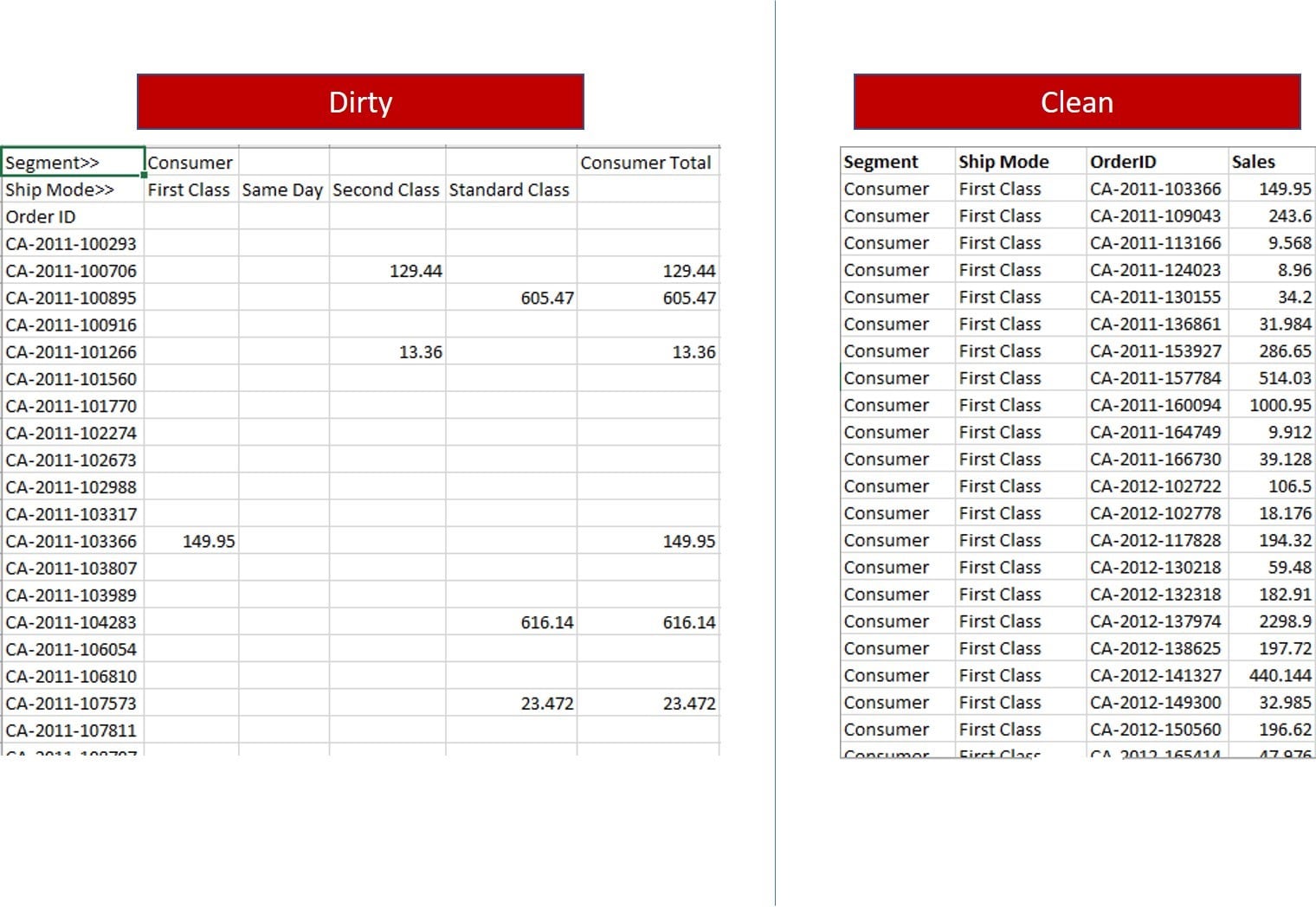
The sheet on the right directly associates a Segment, Ship Mode and OrderID with a Sales amount. The sheet on the left indirectly associates this data. A sales amount that appears in the 2nd column, for example, corresponds to Consumer, First Class. If it appears in the 5th column, it's Consumer, Standard Class and so on. We can use this to find the data we need and build a clean data file.
The first thing we need to do is remove the columns that calculate totals because, as the article I linked points out, they're not needed in clean data. To be specific, the columns in question are Consumer Total, Corporate Total and Home Office Total.
Once that's done we can convert the spreadsheet into a format that's easier to work with so I'm going with CSV. This is done from the File menu and depends on which spreadsheet program you prefer. It should be called 'dirty.csv'. If you call it something else, make sure the code is changed as well. Here's the first few lines of that file:
Segment>>,Consumer,,,,Corporate,,,,Home Office,,,
Ship Mode>>,First Class,Same Day,Second Class,Standard Class,First Class,Same Day,Second Class,Standard Class,First Class,Same Day,Second Class,Standard Class
Order ID,,,,,,,,,,,,
CA-2011-100293,,,,,,,,,,,,91.056
CA-2011-100706,,,129.44,,,,,,,,,
CA-2011-100895,,,,605.47,,,,,,,,
CA-2011-100916,,,,,,,,788.86,,,,
CA-2011-101266,,,13.36,,,,,,,,,
I know what you're thinking: that looks worse. Well, yes, to the eye it does, but to a computer it's a dream and that's how we need to be thinking. We're going to do the following:
- Open the file containing the dirty data.
- Create a file for the clean data.
- Write the headings into the new file.
- Read the first line into the program.
- Write the order ID into the new file.
- Count how many commas there are.
- Use this to work out which segment and ship mode the numerical value corresponds to.
- Write these values to the new file.
- Write the numerical value to the file.
- Move onto the next line and repeat the process.
- Close the files and quit the program.
The Code
Let's go through the lines of the Python code to see how it's all done.
Before we write a single line of code, we need to remove the ridiculous number of headings at the top of the file as we'll add those in via the script. The top line of the data should be the one starting CA-2011-100293. We only want the data.
Now we can start writing the program.
segments = ["Consumer","Corporate","Home Office"]
modes = ["1st Class","Same Day","Second Class","Standard Class"]
First we set up a couple of arrays storing the repetitive data. These can then be selected later on.
f = open('dirty.csv', 'r')
o = open('clean.csv', 'w')
Next we want to open the input (dirty) data file, and the output (clean) data file. If the output file doesn't exist it will be created and if it does exist it will be overwritten.
output = "Segment,Ship Mode,OrderID,Sales\n"
o.write(output)
These lines writes the headers to the beginning of the new file, including a carriage return at the end.
empty = 0
lines = len(f.readlines())
print("Number of rows = ", lines)
f.seek(0)
Next we initialise the empty variable, as this will provide some verification that the program has run correctly. We then find out how many lines of data exist in the dirty file and print it on the screen. This is another way of checking that the program is working properly. We then use the seek property to make sure we're reading from the beginning of the data.
for j in range(0,lines):
This initiates the main loop of the program and runs it until every line of data has been processed.
output = ""
We're going to take a line of the dirty data at a time and rebuild it into a new line. This line will be stored in the output variable and will be written to the new file later.
x = f.readline()
This reads the current line of the file and stores it in a variable called x.
for i in range(0,14):
orderID += x[i]
The order ID is stored in the first 14 characters of each line. There are various ways to do this, but I used a loop to take each character and store it in the orderID variable.
output = orderID
Although we want to write the order ID to the new file, we also want to use it later in the program, so we're going to store it separately from the output we're building.
pos = i + 1
Now we want to move onto the slightly trickier part of the line of data. First we want to keep a track of where we are. As we've dealt with the first 14 characters of the x variable, we are at position 15. This could be stored as an absolute value in the pos variable, but a programmer prefers calculated values in case something changes later.
c = 0
Remember what I said earlier about which column the sales data is in and what that corresponds to? The c variable will store how many commas we find on the line of data and this will tell us everything we need to know next.
while x[pos] == ",":
This loop will run as long as a comma is encountered and it will stop as soon as something other than a comma (in this case, the sales data) is encountered. It reads the character from the current position (pos) in the line of data (x).
pos += 1
c += 1
When a comma is encountered, we increase the value of pos so that the next time the loop runs, it looks at the next character. We also increase the value of c, which is where we're keeping tracks of how many commas we encountered. We could probably use one variable here but it doesn't use much more code and is cleaner.
if c == 1:
output += "," + segments[0] + "," + modes[0]
elif c == 2:
output += "," + segments[0] + "," + modes[1]
elif c == 3:
output += "," + segments[0] + "," + modes[2]
elif c == 4:
output += "," + segments[0] + "," + modes[3]
elif c == 5:
output += "," + segments[1] + "," + modes[0]
elif c == 6:
output += "," + segments[1] + "," + modes[1]
elif c == 7:
output += "," + segments[1] + "," + modes[2]
elif c == 8:
output += "," + segments[1]+ "," + modes[3]
elif c == 9:
output += "," + segments[2] + "," + modes[0]
elif c == 10:
output += "," + segments[2] + "," + modes[1]
elif c == 11:
output += "," + segments[2] + "," + modes[2]
elif c == 12:
output += "," + segments[2] + "," + modes[3]
else:
empty += 1
Long 'if' statements always feel clumsy to me and this might be a quick and dirty way of doing it but it works and isn't a nightmare to read or debug so whatever. There are 12 possible positions that the sales data could be in and, based on that position, we can select the correct segment and ship mode. For example, if we find 1 comma, a string will be constructed (and stored in the output variable) that firstly stores a comma, then the first value of the segments array we set up at the beginning (which is "Consumer"), then another comma, then the first value from the modes array ("1st Class").
If we only find commas, the empty variable gets increased by 1. This is an error-checking method because there shouldn't be any empty rows. If there are, we know something isn't right.
x = x.replace(orderID, '')
The only data we need now is the sales value. There are a number of ways to extract this from the x variable, but the easiest is to remove the data we don't want. The above code takes the line of data and replaces the order ID with nothing. We then overwrite the x variable with whatever is left.
x = x.replace(',', '')
Next we do the same thing but with the commas.
output += "," + x
All that's left in the x variable is the sales value, so we can now add this to the output variable, which is our new line of clean data. Notice that we don't need to include a carriage return here, because there's already one hiding in the x variable.
o.write(output)
The last stage of the main loop is to write the new data into the new file.
print("Empty rows =", empty)
Now we want to print a message on the screen that tells us if any empty values were encountered.
f.close()
o.close()
And that's it! We should now have a new CSV file that has perfect data in it, ready to be imported into your favourite spreadsheet program. If it doesn't look right, you probably missed a step. Have fun debugging your code.
Comments
Post a Comment